排除配置
排除配置通过使用排除配置 设置,可以根据文件/文件夹本地路径、文件类型、进程名称和用户名排除文件/文件夹 。
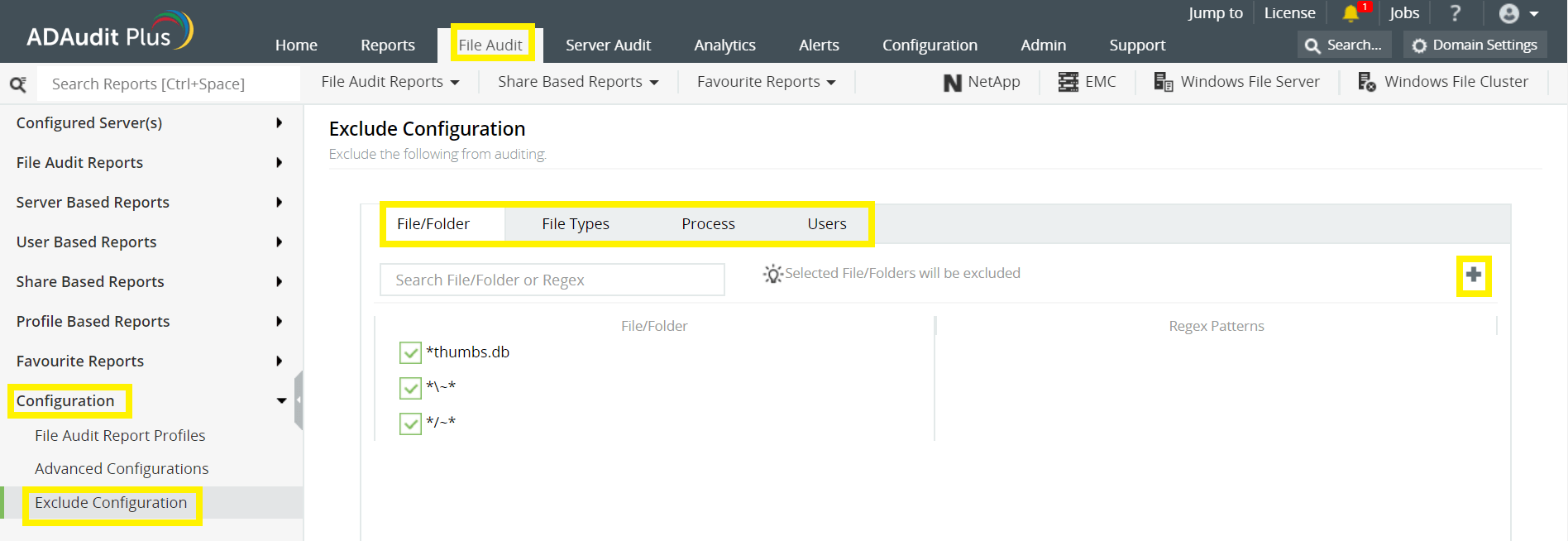
登录 ADAudit Plus 的 Web 控制台 → 转到 文件审核选项卡,导航到左侧窗格,单击 配置 ,然后 单击排除配置 → 选择按 文件/文件夹本地路径、 文件类型、进程名称或用户排除 →单击“+”,然后配置必要的设置。
| Objective | To exclude a folder and all of its subfolders and files | ||||
|---|---|---|---|---|---|
| Share configured |
|
||||
| Path of folder that is to be excluded | C:\sharefolder\excludefolder | ||||
| File/Folder or Regex Patterns | File/Folder Patterns | ||||
| Syntax |
|
||||
| What will get excluded |
|
||||
| What won''t get excluded |
| Objective | To exclude "AppData" folder for every user profile |
|---|---|
| Share and folder path | \\SERVER_NAME\Users C:\Users |
| Path of folder that is to be excluded | C:\Users\user1\AppData |
| File/Folder or Regex Patterns | Regex Patterns |
| Syntax | C:\\Users\\[^\\]*\\AppData |
| What will get excluded |
|
| What won''t get excluded |
|
| Objective | To exclude files from a specific folder but audit all subfolders and its contents |
|---|---|
| Share and folder path | \\SERVER_NAME\share_name C:\sharefolder |
| Path of folder that is to be excluded | C:\sharefolder\excludefolder |
| File/Folder or Regex Patterns | Regex Patterns |
| Syntax | ^C:\\sharefolder\\excludefolder\\[^\\]*\.[^\\]*$ |
| What will get excluded |
|
| What won''t get excluded |
|


|